Open topic with navigation (left menu)
You are here: Getting started > Student startpage
Student startpage
After logging in, students land on a page that contains an aggregated overview of the most used features, such as the grade book, behaviour and attendance overviews, individual learning plans, ePortfolio and files, as well as task lists, latest changes and events.
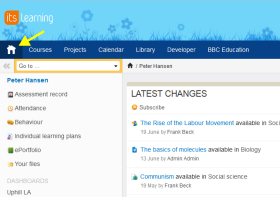
You can always click the Home icon to return to the start page.
Pages and overviews that were available in the person profile, my files and ePortfolio are now directly available from the home page. With this change, most of the information which is valuable to a student is available directly after logging in.
Improved task and events content blocks
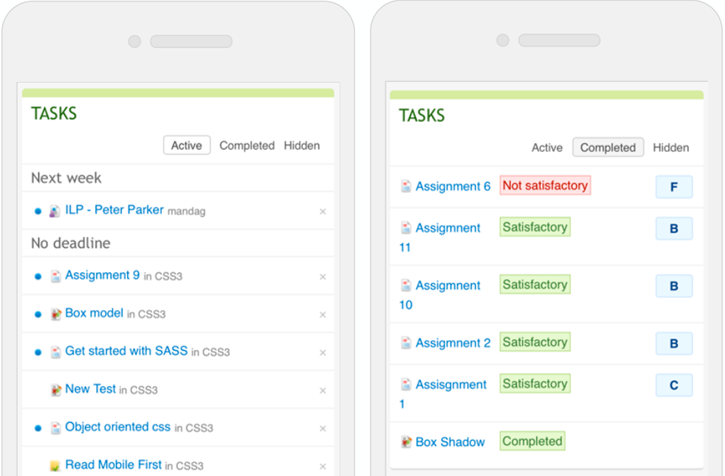
The task list and events content block have also been updated. The new task content block list gives students a clear overview of what needs to be done and when. Previously, two separate content blocks were related to tasks in itslearning: Active tasks and Completed activities. We have combined these blocks into one, so that students can see all information related to tasks in one single place.
Upcoming tasks are split into different sections depending on their due date, providing the user with an overview of the 25 latest tasks split into sections for this week, next week, later, no deadline and overdue. The events block now displays two days of events. Users wanting a broader perspective can follow the link to the calendar, and check out the new list view.
 After logging in, students land on a page that contains an aggregated overview of the most used features, such as the grade book, behaviour and attendance overviews, individual learning plans, ePortfolio and files, as well as task lists, latest changes and events.
You can always click the Home icon to return to the start page.
After logging in, students land on a page that contains an aggregated overview of the most used features, such as the grade book, behaviour and attendance overviews, individual learning plans, ePortfolio and files, as well as task lists, latest changes and events.
You can always click the Home icon to return to the start page.